Google Pay works in Nigeria from 28 October 2026. Four banks switched it on at launch: UBA, GTBank, Zenith Bank and FirstBank, and only their Visa and Mastercard cards. You need an Android phone on Android 9 or newer with NFC, the Google Wallet app, and a card from one of those banks. Tap-to-pay machines are still rare on the street, so for most people the first real use is the “Google Pay” button at online checkout.
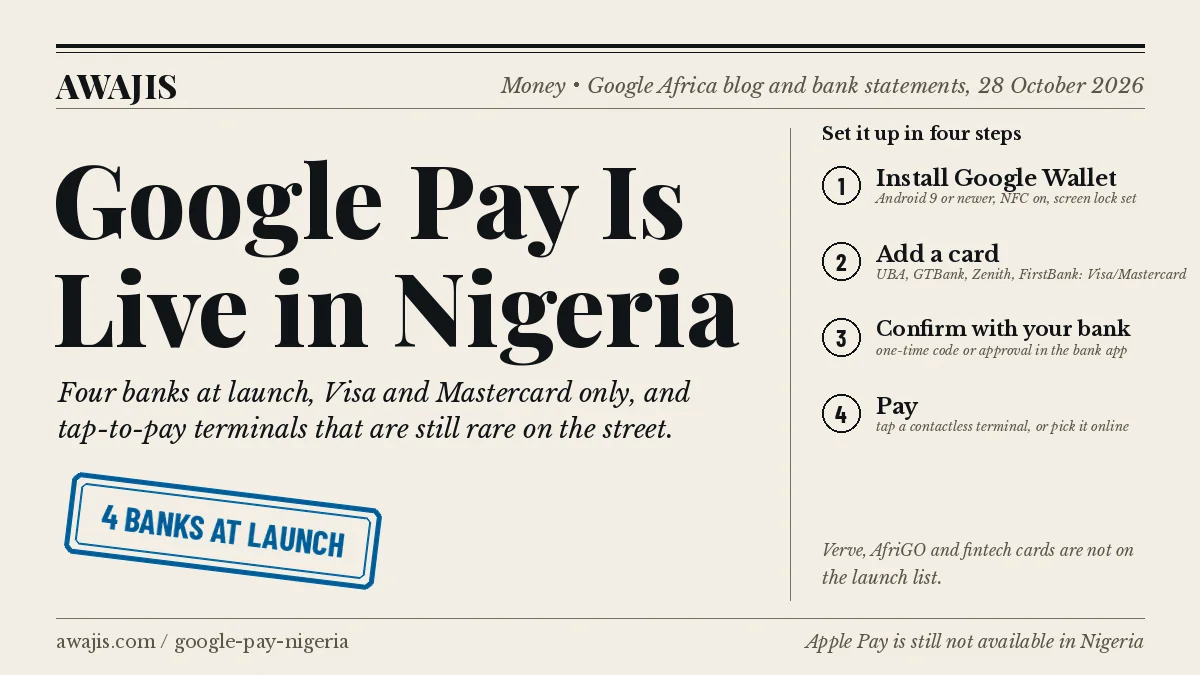
Which banks and cards work with Google Pay in Nigeria
Google’s own announcement only says “participating financial institutions”. The banks named their cards themselves on 27 and 28 October 2026. This is what each one has said so far:
| Bank | Cards it has enabled | What the bank says you can do |
|---|---|---|
| UBA | Visa and Mastercard | Contactless payments at supported terminals, locally and internationally. UBA went live on 27 October and calls itself the first Nigerian bank on Google Pay. |
| GTBank | Eligible debit cards | Online checkout, local and international: subscriptions, flights, food, bills. GTBank’s statement is about online payments; it does not mention tapping in shops. Businesses on its Squad gateway get the Google Pay button at checkout by default. |
| Zenith Bank | Eligible debit cards | Contactless terminals plus online and in-app checkout. |
| FirstBank | Eligible cardholders | Contactless payments with Google Pay’s security features, per its statement to BusinessDay. |
Behind the banks sit the card schemes. Mastercard built the Nigerian rollout with Interswitch, which handles the tokenisation and connects the issuers. Visa says its Nigerian cardholders can also use Google Pay. In both cases, your bank, not the card scheme, has to enable your specific card, so a Visa card from a bank that has not switched Google Pay on will be refused when you try to add it.
What is not on the list, as of 28 October 2026:
- Verve and AfriGO cards. Techpoint, which read Google’s launch list, reports neither domestic scheme is included.
- Cards from OPay, Moniepoint, Kuda and PalmPay.
- Access Bank, Stanbic IBTC, Sterling, Wema, Fidelity, FCMB and the other banks. None had announced support at the time of writing. Banks usually add themselves within months of a launch, so check your bank app’s news tab before giving up.
Not sure which scheme your card is on? The logo is bottom-right on the front. Our Visa vs Verve vs Mastercard guide explains the practical differences.
What phone you need
Google Wallet’s requirements, from Google’s support pages:
- Android 9 or newer. Most phones sold in Nigeria since 2019 qualify; a budget phone still on Android 8 will not.
- NFC. Open Settings and search “NFC”. If nothing comes up, the phone cannot tap, but you can still use Google Pay online.
- A Play Protect certified phone. Rooted phones, custom ROMs and unlocked bootloaders are blocked, and Google Wallet will refuse to add a card.
- A screen lock: PIN, pattern, password or fingerprint. Smart Lock and knock-to-unlock do not count.
- A Wear OS watch also works, paired to a phone that meets the list above.
iPhone users: Apple Pay is still not available in Nigeria. Apple’s country list for Africa stops at Egypt, Mauritius, Morocco and South Africa. A Nigerian card cannot be added to Apple Wallet, and there is no launch date.
How to set up Google Pay in Nigeria
- Install Google Wallet from the Play Store. If you have an older “Google Pay” app, it is not the one; the current app is called Wallet.
- Open it and tap Add to Wallet, then Payment card.
- Scan the card with the camera or type the 16-digit number, expiry and CVV.
- Accept your bank’s terms. The bank then verifies you, usually with a one-time code sent to your registered phone number, or an approval prompt inside the bank app. If the code never arrives, your phone number at the bank is wrong or the card is not yet enabled.
- Set the card as your default if you add more than one.
- To pay in a shop, wake the phone, hold the back of it against the terminal’s contactless symbol for a second or two, and wait for the tick. For amounts above the terminal’s limit it may ask for your card PIN on the machine.
Why it fails: the three common errors at this stage are “This card isn’t supported” (your bank has not enabled it, or it is a Verve card), “Can’t set up on this device” (rooted or uncertified phone), and a verification code that never comes (number mismatch at the bank). None of them is fixed by reinstalling the app.
Where you can actually tap
This is the honest part. Nigeria runs on bank transfers and PoS agents, and most PoS machines in the market or at the junction have no NFC reader. CashAfrica’s CEO, Malik Asamu, told Techpoint that contactless is roughly 0.1% of payments in the country and that about half of the Android phones in use have NFC at all. No PoS provider has yet announced that its agent terminals take phone taps.
Where tapping already works: the newer terminals in supermarket chains, filling-station forecourts, airports, hotels, cinemas and some restaurants, the ones with the four curved-lines contactless symbol on the keypad. If you see the symbol, Google Pay should work there once your bank card is loaded. If you do not see it, pay the old way; the cashier cannot switch it on.
Online is where the launch matters today. Any Nigerian website whose checkout shows a Google Pay button will take your saved card without you typing the number again. GTCO’s Squad has the button live for its merchants; other gateways offer it but each merchant has to turn it on, so expect it to appear site by site. Our payment gateways guide covers who runs which checkout.
Abroad, the picture flips. Contactless terminals are the default in the UK, Europe, the UAE and the US, so a UBA or Zenith card in Google Wallet will tap almost everywhere, subject to your bank’s international spending limit on that card. Travelling to the States? Our list of US stores that accept Google Pay names the few chains that still block it.
What else Google Wallet holds
Payment cards are the headline, but the app also stores loyalty cards, event tickets and boarding passes from airlines and ticket sellers that issue a “Add to Google Wallet” button. That depends on the issuer: a boarding pass from an airline that supports it lands in the app; one that only emails a PDF does not.
Security, and what to do if the phone is stolen
Google Pay never shows the shop your real card number. It sends a token, a stand-in number tied to your phone, so a breached merchant cannot reuse your card details. Every tap also needs the phone unlocked.
If the phone goes missing, three things, in order:
- From any browser, open Find My Device (android.com/find), sign in, and lock or erase the phone. Locking stops Google Pay from working.
- Change your Google account password from another device, which signs the lost phone out.
- Call your bank or use the bank app on another phone to block the physical card if you think the thief also has it. Blocking the card kills the token too.
Fees
Google does not charge you to use Google Pay. A Google Pay transaction is a card transaction, so whatever your bank already charges on that card applies: nothing extra for naira purchases at most banks, and the usual international charges and dollar limits on foreign purchases. No launch bank has published a Google Pay-specific fee, so if yours starts charging one, ask the bank, not Google.
Questions people are asking
Is Google Pay the same as Google Wallet? Google Wallet is the app. Google Pay is the payment feature inside it, and the name the cashier or website sees. You install Wallet, you pay with Pay.
Can I send money to a friend with Google Pay in Nigeria? No. Person-to-person transfers are not part of the Nigerian launch. Bank transfers, USSD codes such as GTBank’s *737# or UBA’s *919#, and the bank apps remain the way to move money between people.
Does tap-to-pay need data? Not for every tap. Google Wallet can complete a limited number of payments offline, then needs to reconnect to refresh its tokens. Adding a card and verifying it does need a connection.
Will my Verve card ever work? Interswitch, which owns Verve, built the Mastercard side of this launch, so the plumbing exists. Nothing has been announced for Verve. Until it is, a Verve-only account cannot use Google Pay.
Does Google Pay work on PoS agent machines? Only if that specific terminal has NFC and the agent’s provider has enabled contactless. Most do not today. Cash-out at an agent still means your physical card or a transfer.
Can I add a dollar card? The bank decides which of its cards are “eligible”. None of the four has said naira-only or dollar cards specifically; try adding it, and the app will tell you.
Sources
- Google Africa Blog, Google Wallet and Google Pay are now available in Nigeria, 28 October 2026.
- BusinessDay, Three Nigerian banks adopt Google Pay; Business Post statements from UBA, GTBank, Zenith Bank and Mastercard and Interswitch, 27–28 October 2026.
- MoreBranches, summarising Techpoint’s reading of Google’s launch bank list and the CashAfrica contactless figures, 28 October 2026.
- Google Wallet Help: device requirements; Apple Support: countries where Apple Pay is available, both read 29 October 2026.
Leave a Reply