A clever Wi-Fi name turns the boring router-setup screen into a chance to make your neighbours laugh, baffle hackers, or pay tribute to your favourite show. Below are 200+ creative SSIDs sorted by theme, plus a quick guide to picking one that’s funny, safe, and actually fits the 32-character limit your router enforces.
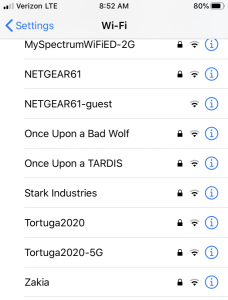
Funny Wi-Fi Name Puns (Lan, Wi-Fi, Router, Modem)
- Pretty Fly for a Wi-Fi
- It Hurts When IP
- Drop It Like It’s Hotspot
- Hide Yo Kids, Hide Yo Wi-Fi
- The LAN Before Time
- Silence of the LANs
- LAN Solo
- Wi-Believe I Can Fi
- 99 Problems but Wi-Fi Ain’t One
- Routers of the Lost Ark
- Bill Wi the Science Fi
- Abraham Linksys
- John Wilkes Bluetooth
- Martin Router King
- Lord of the Pings
- The Promised LAN
- Wu-Tang LAN
- Life in the Fast LANe
- Wi-Fight the Inevitable
- Smooth LANding
- No LAN for the Wicked
- Stuck the LANding
- The Aussie LAN
- FrankLAN Roosevelt
- If You Can’t Beat ‘Em, Modem
Star Wars Wi-Fi Names
- Obi-WLan Kenobi
- The Droid You’re Looking For
- These Aren’t the Droids You Want
- LAN Solo
- Darth Router
- Luke, I Am Your Router
- May the Wi-Fi Be With You
- Live Long and Router
- Yoda One for Me
- Endor’s Forest Moon
- Calrissian Cloud Net
- Jedi Counsel Wi-Fi
- Mos Eisley Cantina Open Wi-Fi
- Stormtrooper Surveillance Van
- The Mandalorian Hotspot
Harry Potter Wi-Fi Names
- You’re a Wi-Fi, Harry
- Lord Voldemodem
- Hogwarts Great Hall Wi-Fi
- The Wi-Fi That Shall Not Be Spoken
- Accio Internet
- The Goblet of Router
- Wingardium LeviSignal
- The Prisoner of Broadband
- Severus Pings
- Diagon Alley Hotspot
- Wizarding IT Department
- Patronum Network
- Ministry of Magic Wi-Fi
- Floo Network
- You Shall Not Password
Game of Thrones & Fantasy Wi-Fi Names
- Winter Net Is Coming
- The North’s Ping
- House LANnister
- LANnisters Send Their Love
- Debt-Free Lannisters
- The Iron Throne Wi-Fi
- Khaleesi’s Khanection
- Where the Wild Pings Are
- Dragon’s Wi-Fi
- The North Remembers Your Password
- Hodor Hodor Hodor
- Rohan Routes
- Mordor Isn’t Just Accessed
- One Wi-Fi to Rule Them All
- My Precious Wi-Fi
Spooky and Warning Wi-Fi Names
Use these to give curious neighbours pause:
- FBI Surveillance Van
- NSA Listening Post
- CIA Mobile Unit
- Click Here for Viruses
- Trojan Horse Network
- C:Virus.exe
- Connecting…
- Loading…
- Searching…
- 404 Network Not Found
- Network Error
- Identity Theft Alert
- We Can Hear You
- I See You Watching
- Skynet Defense Network
- Under Surveillance
- Hacked by Neighbour
- Police Frequency
- Emergency Broadcast Channel
- You’re On Camera
Passive-Aggressive Wi-Fi Names for Neighbours
- Stop Stealing My Wi-Fi
- Tell My Wi-Fi I Need My Pants Back
- Get Your Own Wi-Fi
- The Promised LAN (Closed)
- Pay Your Own Bill
- Pretty Fly for a No-Fi
- Bring Wine Apt 4B
- I Hear You Have Sex At 2 AM
- Your Music Is Too Loud
- Quiet After 10 PM Please
- Stop Borrowing My Wi-Fi
- You Need a Job
- Practice Your Singing Elsewhere
- Your Dog Barks All Night
- Wi-Fi Costs Money
Cool and Mysterious Wi-Fi Names
- The Promised LAN
- Cut the Cord
- Off the Grid
- Down to the Wire
- Going Rogue
- Dungeon Masters Only
- Reservation Required
- Boosted
- In Sync
- Warp Speed
- One Hot Spot
- Nothing But Net
- Authorised Personnel Only
- Members Only Lounge
- The Inner Circle
TV and Movie-Reference Wi-Fi Names
- Vandelay Industries Wi-Fi
- H.E. Pennypacker
- Vance Refrigeration
- Dunder Mifflin Network
- Pawnee Wi-Fi 4 Lyfe
- DHARMA Initiative Station 4
- Hawkins Lab Wi-Fi
- The Upside Down
- Mystery Inc. Hotspot
- Bluth Frozen Banana Wi-Fi
- Wakanda Forever Wi-Fi
- Schitt Creek Public Wi-Fi
- Nakatomi Plaza Network
- Rivendell Wi-Fi
- Tatooine Free Wi-Fi
Tech-Joke Wi-Fi Names
- Hacker Mainframe
- Definitely Not a Wi-Fi
- Get Off My LAN
- Two Routers, One Cup
- Untrusted Network
- Slow Internet
- Free Public Wi-Fi (It’s Not)
- The Ping Is Mightier
- I’m Under Your Bed
- 1 Mbps Is Plenty
- Buffering…
- Please Wait
- Dial-Up Modem 1996
- The Wi-Fi Wizard
- Ping Lord
Music-Inspired Wi-Fi Names
- Another Brick in the Firewall
- Wi-Fi Fighters
- Beethoven WAN
- The Ping of Pop
- Drake’s Hotline Wi-Fi
- Bohemian Hotspot
- Sgt. Pepper’s Lonely Network
- Stairway to LAN
- Hotel California Hotspot
- Sweet Wi-Fi of Mine
- I Will Always Pay My Wi-Fi Bill
- Smells Like Mean Spirit
- Mr. Bandwidth Man
- Don’t Stop Streaming
- Wi-Fi Road
Clean Wi-Fi Names for Offices and Guests
For workplaces, Airbnbs, and family Wi-Fi where puns might confuse guests:
- Welcome Guests
- The Smith Family
- Apartment 4B Wi-Fi
- Reception Network
- Office Guest Wi-Fi
- Conference Room Network
- HouseHold Wi-Fi
- Living Room Hotspot
- Home Office Network
- The Library
- Welcome Mat Wi-Fi
- Stay Connected
- Free Wi-Fi for Patrons
- Family Network
- Common Area Wi-Fi
Cryptic and Short Wi-Fi Names
For when you want neighbours to scroll right past:
- X9
- NETGEAR-32
- 87rgt5
- Linksys
- HOME-WIFI
- Network
- Wi-Fi
- Hidden
- Untitled
- Default
- Router
- Connection
- Setup
- Access Point
- Signal
Pop Culture Wi-Fi Names (Recent Hits)
- Wednesday’s Wednesnet
- Bridgerton Ballroom Wi-Fi
- House of the Dragon Wi-Fi
- Severance Macrodata Net
- The Bear Kitchen Wi-Fi
- Succession HQ Network
- Yellowstone Ranch Wi-Fi
- Squid Game Server
- Ted Lasso Believes
- Loki’s Variant Network
- Andor Rebel Channel
- Acolyte Hidden Network
- Fallout Vault 76 Wi-Fi
- Last of Us Cordyceps Net
- Witcher Toss a Coin Wi-Fi
How to Choose a Wi-Fi Name (SSID)
A few rules will save you grief at setup:
- 32 characters maximum. Routers reject anything longer. Count emoji as 1–4 characters depending on your router’s firmware.
- Stick to letters, numbers, and basic spaces. Some old phones and IoT devices choke on apostrophes, ampersands, exclamation marks, or emoji. Test on your weakest device.
- SSIDs are case-sensitive. “MyWifi” and “mywifi” are different networks; this matters when you tell guests the name.
- Skip personal info. No street numbers, last names, or birth years. Your SSID is broadcast to anyone within range.
- Don’t reuse part of your password. A name like “MySecure_2025” hints at the password format.
- Change the manufacturer default. Names like “Linksys”, “NETGEAR”, or “TP-Link” tell intruders exactly which firmware to attack.
- Hidden SSIDs aren’t more secure. Hiding your network draws attention rather than deflecting it. A strong WPA3 password matters more.
Quick Tips for Setting Your New Wi-Fi Name
- Open your router’s admin page (usually 192.168.1.1 or 192.168.0.1 in your browser).
- Log in with the admin password printed on the router (change this if you haven’t).
- Find the wireless or Wi-Fi settings tab.
- Edit the SSID field with your new name. If you have separate 2.4 GHz and 5 GHz bands, you can rename them differently.
- Save and apply. The router restarts and your devices will need to reconnect with the new name.
Read: Funny Group Chat Names
Read: A-Z List of Popular Brazilian Names for Girls
Was this helpful?Something wrong or missing? Tell us — we read every report and fix issues fast.
Leave a Reply