To cancel WP Engine, log in to the User Portal as the account Owner, open Billing, click Cancel plan (or Request cancellation on premium accounts), and complete the cancellation form. Only an Owner-level user can do this, and WP Engine requires 30 days’ notice before your plan ends. Download your backups first, because all data is deleted once the account closes.
What is WP Engine?
WP Engine is a managed web host built only for WordPress. It runs the technical side for you, your site stays optimized, secure, and fast without much hands-on work. Plans cost more than basic shared hosts, so weigh the price against the features before you commit.
The service includes:
- Quick migration from your old host.
- A free SSL certificate, the security layer that turns on the padlock in browsers.
- Help setting up staging sites, copies where you test changes safely.
- Performance tracking and diagnostic tools.
What should you do before you cancel?
Handle these four things first, because canceling deletes your account:
- Back up your website. All data is removed once the account closes, so download a full backup of every environment.
- Move your domain and email. If either is tied to WP Engine, transfer it to another provider before you cancel.
- Check the refund window. WP Engine offers a 60-day money-back guarantee for new customers on Startup, Professional, Growth, and Scale plans. Request your refund at cancellation if you are still inside that window.
- Line up a new host. Have your replacement hosting ready so your site does not go dark.
How do you cancel a WP Engine plan?
Cancellation runs through the User Portal, and only the account Owner can start it. Support agents cannot cancel for you.
- Open the User Portal and log in as the Owner.
- Click Billing in the left menu, where the plan controls live.
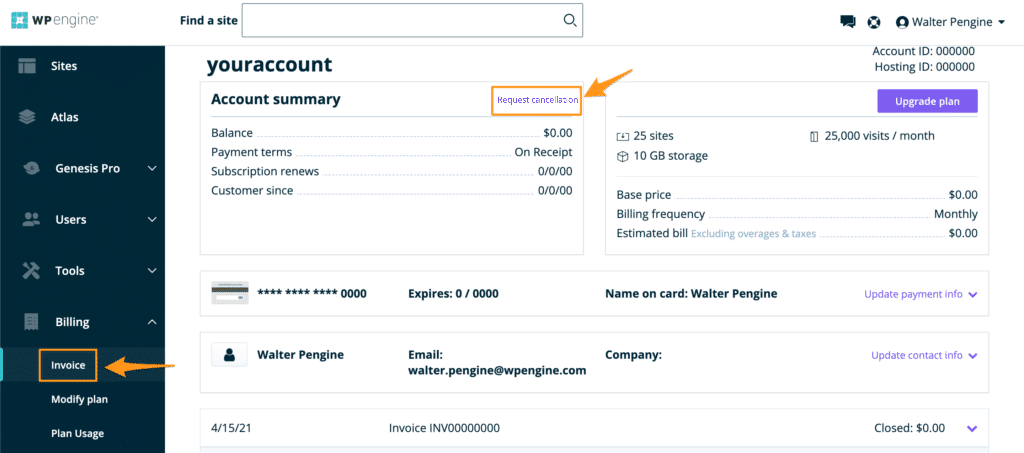
- Scroll to the Modify plan area and click Cancel plan. Premium accounts show Request cancellation instead.
- Pick your reason for canceling.
- Check the box confirming you have downloaded all needed backups and understand you will lose portal access to them once the account closes.
- Submit the cancellation form.
WP Engine requires 30 days’ notice. Your plan stays active through that window, then stops renewing and closes. Submit the form at least 30 days before you want billing to end.
Can you cancel WP Engine by email?
Yes. Email the billing team at billing@wpengine.com and ask them to cancel your account. The same 30-day notice applies.
What should you check after canceling?
- Confirm the cancellation. Watch for an email confirming the request went through.
- Review your final invoice. Check the last billing statement for any unexpected charges.
- Test your new host. If you moved sites, confirm everything loads correctly on the new server before the WP Engine account closes.
How do you reach WP Engine support?
If you hit a snag while canceling, contact the team through:
- Live chat: available in the User Portal and on their website.
- Phone support: call their customer service line.
- Support ticket: submit one from your account dashboard.
Once your 30-day notice ends and the account closes, your sites and backups come down, so make sure your new host is live first.
Read Related Posts:
- How To Cancel Subscription On Cash App
- How to Cancel Time Magazine Subscription
- How to Cancel Google Voice