You can’t fully hide your following list on Instagram. No setting does it. The closest option is a private account, which keeps the private accounts you follow visible only to your followers. Instagram’s own Help Center says anyone can still see the public accounts you follow. To hide everything from one person, block them.
What to know
- Private account: Settings and activity → Account privacy → Private account. Your posts and the private accounts in your lists are then for followers only.
- Public accounts you follow stay visible to anyone on Instagram and Threads, even when you’re private.
- Business accounts can’t go private. Switch back to a personal account first.
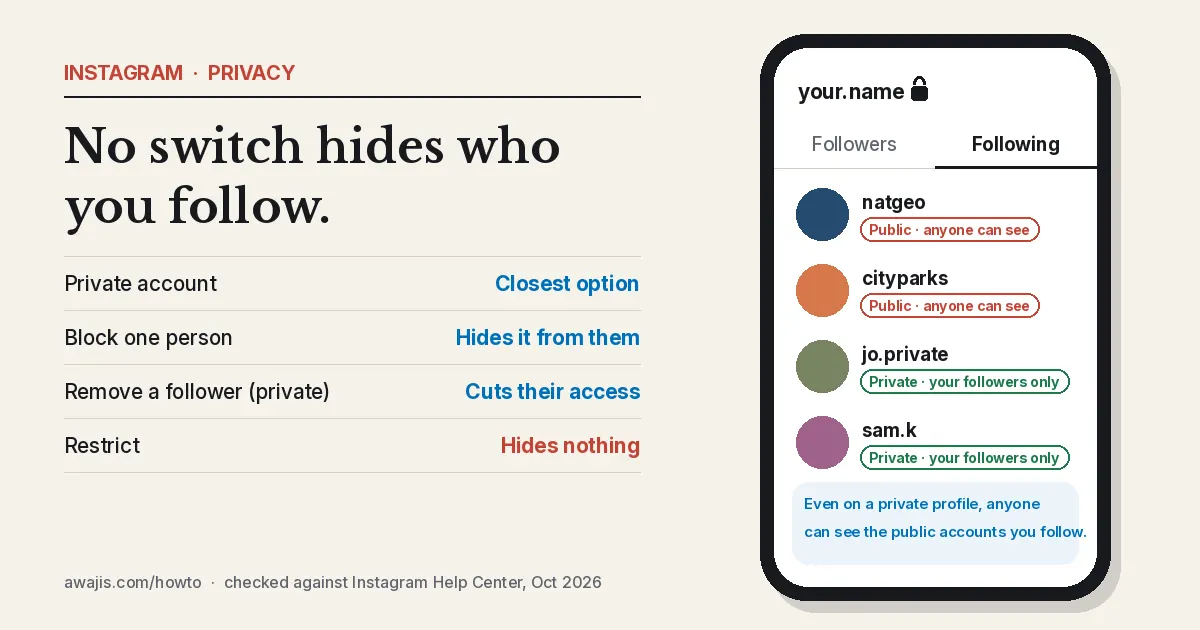
What a private account hides, and what it doesn’t
Most guides say going private hides your whole following list. Instagram’s comparison table is narrower than that:
| Who can see… | Public account | Private account |
|---|---|---|
| Public accounts you follow and that follow you | Anyone on Instagram and Threads | Anyone on Instagram and Threads |
| Private accounts you follow and that follow you | Anyone on Instagram | Your followers |
| Your posts on your profile and in feed | Anyone on Instagram | Your followers |
| Your profile photo, name, username and bio | Anyone | Anyone |
So a private account protects your friends who are private too. It doesn’t hide that you follow a celebrity, a brand or any other public account.
How to make your Instagram account private
On iPhone or Android
- Tap your profile picture in the bottom right.
- Tap the three lines in the top right, then Settings and activity.
- Under Who can see your content, tap Account privacy.
- Turn on Private account, then tap Switch to private to confirm.
On a computer
- Click More in the bottom left, then Settings.
- Click Account privacy below Who can see your content.
- Click the toggle next to Private account, then Switch to private.
People who already follow you keep their access. New people have to send a request, which you can approve or ignore.
Hide your following list from one person
- Block them. Open their profile, tap the three dots in the top right, then Block. A blocked account can’t see your profile, posts or lists. Instagram doesn’t tell them.
- Remove them as a follower. This only helps if your account is private. Open your profile, tap Followers, then Remove next to their name. They lose access to your posts and the private accounts in your lists.
Restrict doesn’t help here. It hides someone’s comments and moves their messages to requests, but your lists stay visible to them.
Things that catch people out
- Business and creator accounts. Instagram doesn’t let business profiles go private. Switch back to a personal account in your settings, then turn on Private account.
- Teens. Accounts for people under 18 are private by default. Teens under 16 need a parent’s or guardian’s permission to switch to public.
- Your name in other people’s lists. Even when you’re private, your account still appears in the follower list of a public account you follow.
- “Hide following” apps. No outside app can change what Instagram shows. These apps ask for your login, which puts your account at risk.
The only sure way to keep an account off your list is to unfollow it. If you’re also wondering what people can see when you save their content, read whether Instagram notifies when you screenshot a story.
FAQ
Can I hide my following list from just one person?
Not with a setting. Block that person, or go private and remove them as a follower. Either way, they lose access to the private accounts in your lists.
If my account is private, can people see who I follow?
Your followers can see your whole list. According to Instagram, everyone else can still see the public accounts you follow, but not the private ones.
Can I hide how many people I follow?
No. Instagram shows the follower and following counts on every profile, public or private. Only the lists behind those numbers change with privacy.
Do my current followers lose access if I go private?
No. Existing followers keep seeing your posts and lists. Only new followers have to send a request.
Checked against Instagram’s Help Center for Android and iPhone, October 2026. Sources: Instagram Help Center: public vs private accounts, SocialBu (May 2026).